
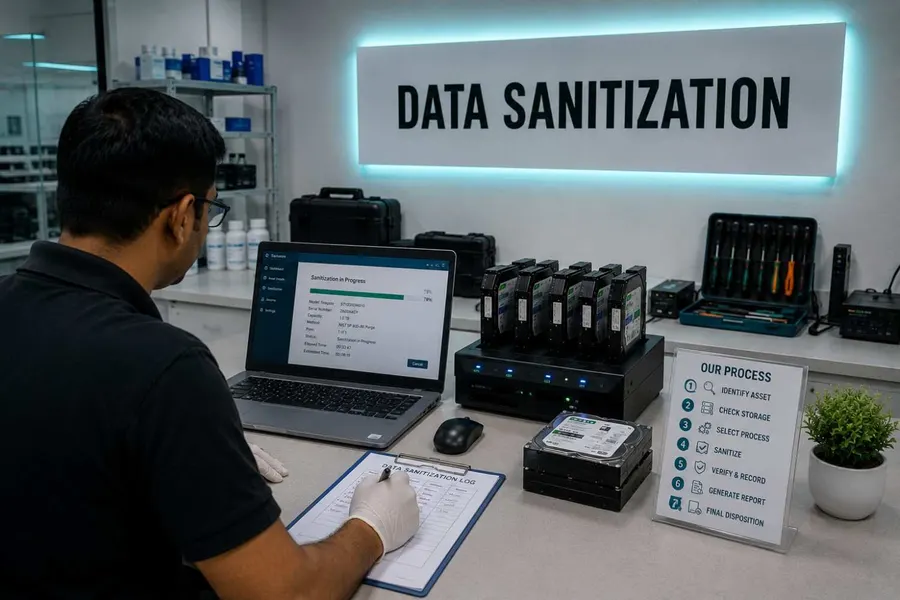
How Does Secure Data Erasure Work?
Secure data erasure is not always the same operation.
Wiping an entire hard drive is different from wiping one partition. Removing selected files is different from clearing the free space left behind by deleted files. Processing several drives at once also requires a different workflow.
The most important step is choosing the right data erasure operation for what you actually need to remove.
Data Sanitization Pro provides five core operations:
- Disk Wipe
- Partition Wipe
- File & Folder Wipe
- Free Space Wipe
- Multiple Drive Wipe
Each operation has a different target and produces a different result.
Choose the Right Data Wiping Operation
Before you start, decide exactly what needs to be erased.
| Operation | Target | What It Does | What It Removes |
|---|---|---|---|
| Disk Wipe | Entire physical drive | Erases the complete selected drive | Everything on the drive |
| Partition Wipe | Selected partition/volume | Erases selected volumes while leaving other partitions intact | Data on selected partitions |
| File & Folder Wipe | Selected files/folders | Erases selected paths while keeping the file system usable | Selected files and folders |
| Free Space Wipe | Unallocated space | Removes traces left by previously deleted files | Previously deleted data |
| Multiple Drive Wipe | Multiple physical drives | Processes several drives concurrently while tracking each separately | Data on selected drives |
The wrong choice can have serious consequences.
Disk Wipe can remove the operating system and everything else on the selected drive, while Partition Wipe is intended for situations where other partitions need to remain available.
How to Securely Wipe an Entire Hard Drive
Use Disk Wipe When the Whole Drive Must Be Erased
Choose Disk Wipe when the entire physical storage device is being retired, reused, resold or otherwise needs to be completely sanitized.
The operation targets the physical drive rather than only the files visible through the operating system.
It is appropriate when you want to remove:
- Operating system data
- User files
- Applications
- Partition information
- Existing volumes
- Other data stored on the selected drive
Before You Start
Confirm the drive's serial number and capacity before beginning.
Do not rely only on the drive's physical position or bay label. Verify the device shown by the software against the asset you actually intend to erase.
Important
If the drive contains the operating system currently being used, you cannot simply erase that drive from inside the running operating system.
Use the bootable environment or supported PXE workflow instead.
How to Wipe a Partition Without Erasing the Whole Drive
Use Partition Wipe
Sometimes the entire drive does not need to be erased.
For example, a computer may have:
- One operating-system partition
- One separate data partition
If only the data partition needs to be sanitized, Partition Wipe allows the selected volume to be erased while leaving the other partition intact.
This can be useful when:
- A system must remain operational
- A data volume is being retired
- One partition contains sensitive information
- Other partitions must remain available
Always Check the Target
Before starting, confirm the selected partition and the data it contains.
Choosing Disk Wipe instead of Partition Wipe can erase the entire physical drive.
How to Securely Wipe Files and Folders
Use File & Folder Wipe
If you only need to remove specific files or folders, use File & Folder Wipe.
The operation targets the selected paths while keeping the file system available for continued use.
This can be useful when you need to remove selected information without sanitizing an entire storage device.
Use It for:
- Individual files
- Sensitive documents
- Selected folders
- Specific business data
- Files scheduled for secure disposal
However, file-level wiping does not automatically address other copies of the information that may exist elsewhere.
Consider:
- Backups
- Shadow copies
- Replicated data
- Cloud storage
- Other storage devices
If the objective is to retire the entire physical device, full-drive sanitization is the more appropriate target.
How to Wipe Deleted Files From Free Space
Use Free Space Wipe
Deleting a file normally does not necessarily overwrite the storage space where its data was previously located.
Free Space Wipe targets unallocated space on a volume to remove traces of previously deleted files.
Existing files remain untouched.
This makes free-space wiping useful when:
- Files were already deleted normally
- The computer is still being used
- You need to address previously deleted data
- You do not want to erase existing files
Important Limitation
Free-space wiping does not automatically reach copies that may exist in:
- Backups
- Shadow copies
- Other volumes
- External storage
- Replicated systems
- SSD-managed locations
If the objective is to completely sanitize a physical storage device before it leaves your control, use an appropriate whole-device sanitization method instead.
How to Wipe Multiple Drives at Once
Use Multiple Drive Wipe
When processing several HDDs, SSDs or other supported storage devices, running separate jobs one after another can make asset processing unnecessarily complicated.
Multiple Drive Wipe allows several drives to be processed concurrently within one case.
Each drive remains individually tracked.
That means:
- Drive 1
- Result Drive 2
- Result Drive 3
- Result Drive 4
- Result
A failure on one device does not simply disappear inside a batch result.
This workflow is useful for:
- ITAD operations
- Refurbishers
- Enterprise IT teams
- Data centers
- Hardware recycling
- Bulk laptop processing
- Storage device retirement

How to Erase the Windows System Drive
You Cannot Safely Wipe the Active OS Drive From Inside Windows
If the storage device you want to erase contains the operating system currently running the computer, that drive is in use.
The recommended workflow is to start the system from a supported bootable USB environment or PXE network boot so the target drive is no longer being used by the running operating system.
Once booted into the erasure environment, the target storage device can be selected and processed.
How to Identify the Correct Drive Before Wiping
This is one of the most important steps in secure data wiping.
Before pressing Erase, check:
Serial Number
Match the serial number shown by the software with the physical asset.
Model
Confirm that the manufacturer and model match the intended device.
Capacity
Use capacity as another identifier when several similar drives are present.
Interface
Check whether the device is connected through SATA, SAS, NVMe, USB or another supported interface.
Physical Asset Record
Where applicable, compare the device information with your asset-management record.
Always identify the device before you erase it.
A bay number or workstation label can change. The drive's serial number is a much stronger asset identifier.
HDD, SSD & NVMe Require Different Considerations
Hard Drive Data Wiping
Traditional HDDs commonly use overwrite-based sanitization methods.
The appropriate method should be selected according to your organizational policy and the storage device.
SSD Data Erasure
SSDs use controllers and flash-management techniques that can make traditional repeated overwriting unsuitable as the only sanitization approach.
Where supported, use the device's appropriate sanitize or secure erase capability.
Read MoreNVMe Data Erasure
For supported NVMe devices, use an appropriate device-level sanitization capability rather than assuming a traditional HDD overwrite procedure provides the same result.
Read MoreSelf-Encrypting Drives
For supported self-encrypting storage, an appropriate cryptographic erase workflow may be used where required.
The important rule is simple:
Don't treat every storage device as if it were an HDD.
How to Choose the Right Data Erasure Method
The operation and the erasure standard are two different decisions.
First decide:
What do I need to erase?
Then decide:
Which sanitization method should I use?
For example:
| Requirement | Operation |
|---|---|
| Retire the entire drive | Disk Wipe |
| Erase one data partition | Partition Wipe |
| Remove selected files | File & Folder Wipe |
| Remove traces of deleted files | Free Space Wipe |
| Process several drives | Multiple Drive Wipe |
After choosing the operation, select the appropriate data erasure standard based on your storage technology and organizational requirements.
Verify the Data Erasure Result
A secure wiping process should not end simply because the progress bar reaches 100%.
The result should be checked according to the selected sanitization workflow.
Data Sanitization Pro records information about the drive during processing and generates documentation after the operation.
The workflow connects:
- Identify
- Erase
- Verify
- Report
This gives you a record of what happened to the selected asset.

What If the Drive Fails?
Not every drive will successfully complete every operation.
A device may:
- Refuse a sanitization command
- Experience hardware errors
- Fail the selected verification
- Become unreliable during processing
- Be unable to complete the required operation
Do not mark such a drive as successfully sanitized.
Follow your organization's approved exception and disposal process.
Where physical destruction is required, the failed device can be routed for appropriate destruction rather than being passed as successfully erased.
Offline Data Erasure
Data Sanitization Pro can be used in environments where an internet connection is not appropriate or available.
This is especially useful for organizations handling sensitive equipment in:
- Secure facilities
- Government environments
- Defence environments
- Data centers
- Air-gapped networks
- Restricted IT environments
A secure offline workflow can allow the storage device to be processed without requiring normal online connectivity.

A Simple Secure Data Erasure Workflow
Step 1 — Identify
Confirm the device model, serial number and capacity.
Step 2 — Choose the Operation
Select:
- Disk
- Partition
- File/Folder
- Free Space
- Multiple Drive
Step 3 — Select the Method
Choose the appropriate data erasure standard or device-level sanitization technique.
Step 4 — Start the Job
Run the selected operation.
Step 5 — Verify
Check the completed sanitization according to the configured workflow.
Step 6 — Review the Result
Confirm the final status and identify any failed or exceptional devices.
Step 7 — Generate the Certificate
Retain the resulting documentation with the asset record.
Common Data Wiping Mistakes
Choosing Disk Wipe When You Only Need a Partition
This can remove the entire operating system and other partitions.
Choosing Partition Wipe When the Whole Device Is Being Retired
Data may remain on other partitions or areas of the physical drive.
Assuming Deleted Means Securely Erased
Normal deletion does not necessarily sanitize previously occupied storage space.
Using HDD Overwrite Logic on Every SSD
Modern flash storage requires storage-aware sanitization considerations.
Skipping Device Identification
Always confirm the serial number before processing.
Ignoring Failed Verification
A failed verification should be treated as an exception, not a successful erasure.
Frequently Asked Questions
How do I securely wipe a hard drive?
Identify the correct physical drive, select the appropriate full-drive erasure operation and choose a suitable sanitization method. If the drive contains the running operating system, boot into the supported erasure environment first.
Can I wipe only one partition?
Yes. Use Partition Wipe when you need to erase selected volumes while keeping other partitions intact.
Can I securely erase individual files?
Yes. File & Folder Wipe targets selected files and folders while keeping the file system usable.
What is a free space wipe?
A free-space wipe targets unallocated storage space where data from previously deleted files may remain.
Can I wipe several drives at the same time?
Yes. Multiple Drive Wipe is designed to process several drives concurrently while maintaining individual tracking for each device.
Can I wipe the drive Windows is running from?
Not from inside the active Windows environment. Use the supported bootable USB or PXE workflow so the target drive is not being used by the running operating system.
Is overwriting enough for an SSD?
You should not automatically assume that traditional overwrite passes are sufficient for every SSD. Supported SSDs may provide device-level sanitize or secure-erase capabilities that are more appropriate for the storage architecture.
Does free-space wiping erase backups?
No. A free-space wipe operates on the selected volume. Copies stored in backups, shadow copies or other systems are outside that operation.
Do I need an internet connection?
Data Sanitization Pro supports offline use, making it suitable for environments where devices cannot or should not be connected to the internet.
What happens if a drive fails verification?
The drive should not be reported as successfully sanitized. It should follow the organization's documented exception process and may require physical destruction where appropriate.
Does the software generate a certificate after erasure?
The data erasure workflow produces documentation identifying the asset, selected method and verification result.
Ready to Securely Erase Your Storage Devices?
Whether you're securely and permanently wiping one hard drive or processing multiple storage devices, Data Sanitization Pro provides a structured workflow for data erasure, verification and reporting.
Permanent data erasure, a checked result and a certificate for every drive.