CCTV NVR Data Erasure Software for Network Video Recorders
CCTV NVR data erasure software wipes the hard drives and SSDs from a network video recorder by overwriting old footage and verifying the result. Data Sanitization Pro (DSP) erases and verifies each drive and issues a certificate for it, for security integrators, businesses and ITAD teams.
A modern NVR can store large amounts of surveillance recordings. Depending on the system, that storage may involve an internal HDD, SSD, multiple storage drives or supported network storage. When the NVR is replaced, redeployed, refurbished, resold or retired, simply deleting recordings or reconfiguring the system should not automatically be treated as a complete, documented data sanitization process.
Data Sanitization Pro helps organizations identify, erase, verify and document supported storage through a controlled software-based logical data destruction workflow.
- CCTV NVR
- Network Video Recorder
- NVR Storage
- NVR HDD
- NVR SSD

Secure Data Erasure for CCTV NVRs
NVR systems continuously handle surveillance data. Recorded video may include sensitive information from offices, warehouses, retail stores, factories, campuses, hospitals, financial locations and other monitored environments.
When an NVR reaches its configured storage limit, the system may overwrite older recordings with newer footage. Some NVR platforms also provide storage formatting, initialization or deletion functions. These are operational storage-management functions and should not automatically be confused with a structured, documented NVR data sanitization workflow.
A professional CCTV NVR wipe software workflow can follow a controlled process:
- Identify
- Select
- Erase
- Verify
- Certify
Data Sanitization Pro is designed for software-based logical data destruction. It does not physically shred, crush, drill or otherwise destroy the storage hardware.
What Does CCTV NVR Data Sanitization Mean?
CCTV NVR data sanitization is the controlled process of removing stored surveillance information from supported NVR storage media according to the selected sanitization method and organizational requirements.
This matters when an NVR or its storage device is:
- Being replaced
- Moving to another site
- Being reused
- Being refurbished
- Being resold
- Being returned
- Being decommissioned
- Being retired
- Being processed through ITAD
Common NVR actions include:
- Delete recordings
- Format HDD
- Initialize storage
- Delete old footage
- Allow automatic overwrite
These actions may remove or overwrite recordings within the NVR's normal operating environment, but a professional NVR data erasure workflow also focuses on controlled processing, verification and documentation.
For example, manufacturer documentation shows that NVR systems can initialize HDDs and that initialization erases data on the selected HDD. NVR systems may also be configured to overwrite older recordings when storage is full.
Data Sanitization Pro: Built for Controlled NVR Erasure
Data Sanitization Pro is full data erasure software, not a basic NVR wipe tool. It erases each drive, checks the result and records it.
Permanent Data Erasure
DSP is designed for permanent logical data erasure on supported storage devices associated with NVR workflows.
26 Data Erasure Methods
DSP supports 26 data erasure methods, allowing organizations to select a method according to their internal policy, media type and intended sanitization outcome.
Verification
The completed erasure process can be verified through the supported verification workflow and the result can be recorded.
Auditable Reporting
DSP generates self-issued, auditable data erasure reports and certificates containing relevant device and processing information.
Storage Identification
Available storage information can be associated with the sanitization job.
- Manufacturer
- Model
- Serial Number
- Capacity
- Interface
- Firmware
Storage Health Assessment
Available SMART, bad-sector, read-error and storage-health information can help teams evaluate the condition of a supported NVR storage drive before reuse.
Multi-Drive Processing
DSP can erase all connected drives simultaneously, subject to system hardware and configuration.
Offline Operation
Supported offline workflows can be used in controlled environments where internet connectivity is restricted.
From NVR Storage Detection to a Verified Erasure Certificate
- 01
Detect the Storage
DSP identifies the supported connected storage device and reads available information.
- Manufacturer
- Model
- Serial Number
- Capacity
- Interface
This helps connect the storage asset with the sanitization job.
- 02
Select the Sanitization Method
The operator selects the appropriate CCTV NVR data erasure method based on the storage media organizational policy and intended outcome.
- 03
Erase the Data
DSP performs the selected logical NVR data wiping process on the supported storage device.
The physical storage hardware remains intact.
- 04
Verify the Result
The completed operation is checked through the applicable verification workflow.
- 05
Certify and Report
DSP generates the relevant NVR erasure certificate and report information for the completed operation.
How to Delete NVR Footage Permanently
The main purpose of an NVR is recording.
That means the storage device may contain:
- CCTV recordings
- Video footage
- Motion-triggered recordings
- Event recordings
- Scheduled recordings
- Exported surveillance data
- System-related storage information
This creates several commercial search intents around:
NVR recording data erasure
NVR video data erasure
NVR footage erasure
NVR video recording sanitization
CCTV NVR storage sanitization
A professional sanitization process addresses the storage media rather than relying only on individual file deletion through the recorder interface.
How to Wipe an NVR Hard Drive
Many NVR deployments use storage drives specifically intended for continuous video recording.
When an NVR is retired or upgraded, its NVR HDD can remain a separate data-bearing asset.
Take the drive out of the NVR and connect it to a PC running DSP. DSP then runs a structured NVR HDD erasure workflow:
- Detect
- Erase
- Verify
- Certificate
This can be useful during:
- NVR replacement
- CCTV modernization
- Security-system upgrades
- Storage-drive replacement
- Site relocation
- Refurbishment
- Equipment retirement
- ITAD processing
A NVR storage drive can be successfully sanitized while still requiring a separate physical-condition assessment before reuse.

NVR SSD & Flash Storage Sanitization
Some modern video-recording environments may use SSD or other flash-based storage.
For this reason, NVR SSD erasure and NVR flash storage sanitization should be handled according to the actual storage technology and supported sanitization capabilities.
DSP can work with supported storage configurations and apply the selected software-based sanitization workflow.
The specific erasure method should depend on the actual media, storage implementation and required outcome rather than assuming that every NVR uses the same technology.

Permanent CCTV NVR Data Erasure
Organizations searching for permanent NVR erasure, secure NVR wiping or complete NVR data sanitization are usually concerned about what happens to old surveillance data after the device leaves service.
For Data Sanitization Pro, the relevant capability is:
Permanent Software-Based Logical Data Erasure
DSP is designed to permanently erase stored information from supported storage media through the selected logical sanitization process.
The physical storage drive remains available for its next lifecycle stage when its condition permits reuse.
The purpose is straightforward:
Protect the data. Preserve the hardware. Document the process.
CCTV NVR Data Erasure Verification
A successful storage operation should have a corresponding result that can be reviewed.
Data Sanitization Pro separates the erasure process from the verification result.
Relevant job information can include:
- Manufacturer
- Model
- Serial number
- Capacity
- Interface
- Erasure method
- Processing status
- Verification result
- Processing time
- Operator information
- Asset reference
This helps organizations answer an important operational question:
What happened to this specific NVR storage device?
That asset-level traceability becomes particularly valuable when large numbers of storage drives are processed.

CCTV NVR Erasure Certificates & Reports
A professional CCTV NVR erasure certificate should be connected to the individual storage asset and the sanitization job performed on it.
Data Sanitization Pro gives you self-issued, auditable data erasure reports and certificates, one per drive. See what a data erasure certificate contains or look at our sample erasure reports.
The documentation can connect:
- Asset Identity
- Erasure Method
- Processing Details
- Verification Result
- Certificate
Relevant report information can include:
- Storage manufacturer
- Storage model
- Serial number
- Capacity
- Interface
- Selected erasure method
- Verification status
- Processing timestamps
- Operator information
- Asset reference
- Report or certificate identification
This can support internal records, customer documentation, asset management and audit preparation.
Process Multiple NVR Storage Drives
Security integrators, CCTV service companies, ITAD providers and enterprise IT teams may need to process multiple NVR storage drives during large replacement projects.
Data Sanitization Pro can erase all connected drives simultaneously.
Actual throughput depends on:
- Drive performance
- Storage interfaces
- Controllers
- Host hardware
- Bus bandwidth
- System resources
This makes the platform useful for structured bulk NVR data erasure rather than processing every storage drive individually.

CCTV NVR Decommissioning Data Erasure
When an NVR is decommissioned, the physical recorder and its storage media should be treated as separate asset considerations.
A structured CCTV NVR decommissioning workflow can include:
- Identify
- Access Supported Storage
- Erase
- Verify
- Report
- Reuse / Resell / Retire
This helps create a clear record for every storage asset processed during the project.
It can also support NVR retirement data erasure when security infrastructure is being replaced across multiple locations.

NVR Data Erasure Before Disposal
Before an NVR or its storage drive is sent for disposal, recycling or another downstream process organizations should determine how stored information will be addressed.
DSP can support the logical sanitization stage for supported storage media.
The objective is to ensure that the selected sanitization process is completed and documented before the asset moves to the next stage.
Where reliable software-based sanitization cannot be completed because the storage is inaccessible, defective or unsupported, another approved disposition method may be required.

Wipe an NVR Before Selling or Reusing It
Reuse
Sanitize previous surveillance data before assigning the NVR or supported storage to another location.
Redeployment
Erase stored information before moving equipment between branches, offices or facilities.
Refurbishment
Remove previous surveillance data before preparing used NVR equipment for refurbishment.
Resale
Complete the required sanitization process and retain the associated certificate before the asset changes ownership.
Return
Sanitize storage before leased, rented or returned equipment leaves organizational control.
ITAD
A documented ITAD NVR erasure workflow can connect storage sanitization with asset disposition and retirement records.
Enterprise CCTV NVR Sanitization
Large surveillance deployments may involve storage assets across many locations.
Professional enterprise NVR erasure software can help standardize processing during:
- CCTV modernization
- Branch upgrades
- Security-system replacement
- Multi-site deployment changes
- Data-centre security upgrades
- Large-scale equipment retirement
A consistent workflow makes it easier to connect each storage asset with its erasure result and certificate.

NVR Data Sanitization Standards
Pick the erasure method by drive type, how sensitive the footage is and your own policy. DSP supports NIST SP 800-88 Clear and Purge and other methods listed on our data erasure standards page.
The current NIST publication is:
NIST SP 800-88 Rev. 2
NIST defines media sanitization as a process intended to make access to target data infeasible for a given level of effort and recommends establishing appropriate sanitization controls according to information sensitivity and media characteristics. Rev. 2 was finalized in September 2025 and superseded Rev. 1.
For NVR storage, the applicable sanitization approach should be selected based on the actual storage technology and organizational policy.
A standards reference should not be confused with a specific technical erasure command.
- Standard / Guideline
- Defines requirements or guidance
- Erasure Method / Command
- Performs the technical operation
- Verification
- Provides evidence of the completed process
- Certificate / Report
- Documents the result
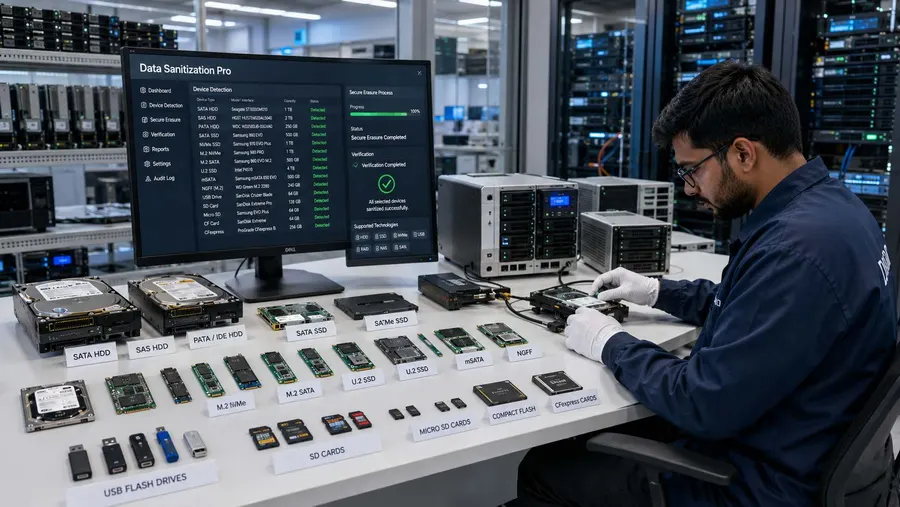
When an NVR Storage Drive Cannot Be Reliably Erased
Software-based NVR storage sanitization depends on the target storage being accessible and able to complete the selected operation.
Additional technical assessment may be needed when the storage device:
- Is not detected
- Has severe read/write errors
- Has controller problems
- Has firmware limitations
- Is physically failing
- Cannot complete the selected process
- Uses an unsupported connection path
- Cannot provide the required verification result
A failed or incomplete operation should never be reported as a successful NVR data erasure.
Data Sanitization Pro is a software-based logical data destruction solution. Physical destruction of storage devices is outside the scope of this software.

Offline NVR Data Sanitization
Some security environments require storage assets to remain inside a controlled processing area.
Data Sanitization Pro supports offline data sanitization workflows for supported deployments.
This can be useful for:
- Restricted IT environments
- Controlled security environments
- Isolated sanitization workstations
- Sensitive surveillance operations
- Internal asset-processing locations
The exact deployment model depends on the organization's infrastructure and software licensing.

CCTV NVR Sanitization Across the Asset Lifecycle
A professional NVR data erasure software workflow can support multiple lifecycle stages.
Reuse
Erase previous surveillance information before redeployment.
Redeployment
Sanitize storage before moving an NVR to another site.
Refurbishment
Remove stored recordings before preparing equipment for refurbishment.
Resale
Document sanitization before the device changes ownership.
Return
Sanitize storage before equipment leaves organizational control.
Retirement
Complete the selected logical data erasure process and retain the certificate.
Disposal
Complete the appropriate sanitization or approved destruction workflow before downstream disposal.
Who Uses CCTV NVR Data Sanitization Software?
CCTV Security Companies
For storage sanitization during NVR replacement and security-system upgrades.
CCTV Integrators
For handling customer NVR storage during installation and replacement projects.
Enterprise IT Teams
For controlled data erasure during infrastructure modernization and asset retirement.
ITAD & Refurbishment Companies
For bulk NVR HDD/SSD wiping, verification, reporting and asset documentation.
Government Organizations
For structured handling of surveillance storage during equipment retirement.
Banking & Financial Organizations
For protecting stored surveillance information during security-system lifecycle changes.
Healthcare & Commercial Organizations
For controlled sanitization of storage used by surveillance infrastructure.
Certifications, Verification & Trust
Data Sanitization Pro combines software-based logical data destruction with verification and documented output.
Software-Based Logical Data Destruction
Controlled sanitization of supported NVR storage without physically destroying the drive.
Verification
A documented result for the completed sanitization operation.
Self-Issued Certificates
Reports and certificates generated from the completed erasure workflow.
ISO & STQC Credentials
Applicable ISO and STQC credentials should be represented according to the exact documented certification or assessment scope.
It is important to distinguish between:
Software-generated Erasure Certificate
Documents a specific completed sanitization job.
ISO / STQC Certification or Assessment
Refers to the documented certification or assessment scope associated with the relevant credential.
Why Choose Data Sanitization Pro for CCTV NVR Erasure?
Certified Data Sanitization Software
Built for controlled and documented storage sanitization.
NVR-Focused Workflow
Designed around storage identification, erasure, verification and reporting.
26 Erasure Methods
Multiple supported methodologies for different organizational requirements.
Permanent Logical Erasure
Designed for permanent software-based data erasure on supported storage.
Verification
Check and record the completed sanitization result.
Auditable Certificates
Generate self-issued data erasure certificates and reports.
Multi-Drive Processing
Process all connected drives simultaneously.
Offline Operation
Support controlled sanitization environments without requiring normal internet access.
Storage Health Assessment
Review available health and error information before reuse.
Lifecycle Ready
Support reuse, refurbishment, resale, return, retirement and ITAD workflows.
Frequently Asked Questions
What is CCTV NVR data erasure software?
CCTV NVR data erasure software is used to sanitize stored information from supported storage media used by Network Video Recorders. Data Sanitization Pro combines logical data erasure, verification and reporting.
Can I permanently erase data from an NVR hard drive?
Data Sanitization Pro is designed for permanent logical data erasure on supported NVR storage devices. The final result depends on the selected method and successful completion and verification.
Is deleting CCTV footage enough?
Deleting individual recordings is not the same as a complete documented media sanitization workflow. A professional process can add controlled erasure, verification and reporting.
Can DSP erase NVR footage?
DSP is designed to sanitize supported storage media containing stored information, including media used for NVR recordings. The target storage must be accessible through a supported sanitization environment.
Can I wipe an NVR HDD before resale?
Yes. DSP can support a structured NVR HDD data erasure workflow before resale or reuse when the target drive and deployment are supported.
Does DSP erase the NVR itself?
DSP performs software-based logical data destruction on supported storage. It does not physically destroy the NVR hardware.
Can DSP generate an NVR erasure certificate?
Yes. DSP can generate self-issued, auditable data erasure reports and certificates containing relevant device and processing information.
Can multiple NVR hard drives be erased simultaneously?
DSP can erase all connected drives simultaneously, subject to available hardware and system configuration.
Can DSP be used for ITAD NVR sanitization?
Yes. DSP can support structured NVR storage sanitization for ITAD, refurbishment, reuse and resale workflows.
Does NVR data erasure require the NVR to remain connected to the network?
Not necessarily. The sanitization workflow concerns the supported storage media. Data Sanitization Pro also supports offline workflows for appropriate deployments.
Does DSP physically destroy an NVR hard drive?
No. DSP is a software-based logical data destruction solution. Physical destruction requires a separate approved process.
Do I Need to Take the Hard Drive Out of the NVR?
Yes, in most cases. DSP runs on a PC or from a bootable USB, not inside the NVR. Remove each drive and connect it to that PC by SATA or a supported adapter. DSP then erases it, verifies it and issues a certificate with the serial number.
Is NVR Data Erasure Different From DVR Data Erasure?
The drive wipe is the same kind of job. NVRs more often hold several drives or SSDs, so there are more drives to track. Each one should be erased and certified on its own. For analogue recorders, see our CCTV DVR data erasure page.
Which Software Can Wipe Many NVR Hard Drives at Once?
Data Sanitization Pro can wipe all connected drives at the same time on one PC. Each NVR drive gets its own verification result and certificate, so you can match every drive to its serial number during a large CCTV upgrade.
Does the DPDP Act Apply to NVR Recordings?
Recordings that show identifiable people can be personal data under the DPDP Act 2023. Wiping NVR drives before they leave your control and keeping the certificate, helps you show the footage was erased. It does not make you compliant by itself. See our data erasure compliance page.
Secure Your NVR Storage Before It Changes Hands
Your surveillance data still needs to be handled properly.
Permanent data erasure, a checked result and a certificate for every drive.